Debug mode is a useful tool for identifying errors when managing a WordPress site or developing themes. However, have you ever left the error log output enabled and suddenly found your server's storage capacity was being strained?
Manually opening FTP and deleting or emptying debug.log file each time is a tedious and annoying task.
Therefore, in this article, I will introduce " LH Clear Debug Log by Cron," a plugin that completely automates the problem of bloated debug logs. It is extremely niche, with only "10+" active installations, but once configured, it is an excellent tool that intelligently manages logs in the background.
This article provides a clear explanation of the plugin's detailed internal specifications and the results of testing it in the latest WordPress 7.0 environment. If you want to reduce the effort involved in log management and maintain optimal site performance, please refer to this article.
- Causes and risks of WordPress debug log (debug.log) becoming excessively large
- Internal specifications and mechanism of the plugin "LH Clear Debug Log by Cron"
- [Operation Verification] Even with an official version that hasn't been updated in 4 years, normal operation has been confirmed in the latest WordPress 7.0 environment.
- Summary: A lightweight solution that frees you from manually deleting error logs.
Causes and risks of WordPress debug log (debug.log) becoming excessively large
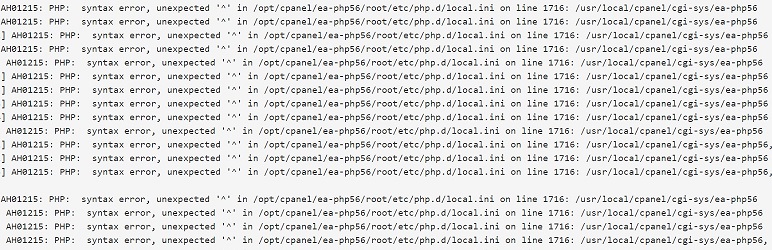
WordPress's debug mode (WP_DEBUG_LOG) is useful for troubleshooting and customizing bugs. However, if you continue to run your WordPress site with this mode enabled, errors and Notices will accumulate, and the log file can grow to several gigabytes in size.
If log files become too large, they risk causing the following problems:
- The server's disk space is being consumed, causing the site to go down.
- The server's I/O load increases, slowing down the website's loading speed.
Log problems often become irreversible by the time you notice them, and manually opening FTP and deleting them each time is inefficient.
Internal specifications and mechanism of the plugin "LH Clear Debug Log by Cron"
" LH Clear Debug Log by Cron " is a very niche plugin, with only "10+" active installations, but it's a practical plugin specifically designed for automatic log cleanup. The internal specifications, as published in the official FAQ, are as follows:
The threshold for automatic deletion is "4MB".
By default, the log file is automatically cleared (emptied) when it exceeds 4,194,304 bytes (approximately 4 MB). This ensures that the file is reset in increments of a few MB before it reaches several GB, preventing it from overwhelming the server.
Customizing capacity limits with filter hooks
By using the filter hooks provided within the plugin, you can freely change the size threshold (4MB) for deletion. You can adjust it from the code side to suit your site's operating environment, such as "delete at 2MB" or "allow up to 10MB".
Background processing using WP-Cron
We will use WordPress's scheduled execution system (WP-Cron) to periodically monitor and delete log files based on their size.
[Operation Verification] Even with an official version that hasn't been updated in 4 years, normal operation has been confirmed in the latest WordPress 7.0 environment.
The official metadata states "Last updated: 4 years ago" and "Verified latest version: 6.0.12," which at first glance raises concerns about its suitability for installation.
However, we have verified and confirmed that it is properly automatically deleted (cleared) when the debug log exceeds 4MB in an actual "WordPress 7.0" environment.
Because it has an extremely simple code design with a single function (single task) and no administration panel (UI) or unnecessary settings pages, it is less affected by major WordPress updates and works stably even with the current version.
Summary: A lightweight solution that frees you from manually deleting error logs.
While it's not a flashy tool for everyone, " LH Clear Debug Log by Cron" is a very reliable option for administrators who "keep the development environment in debug mode at all times" or "want to monitor logs in the production environment while also imposing capacity limits."
To be honest, you can achieve the same result by pasting the following PHP code into function.php or the "Code Snippets" plugin, and then setting the "WP Crontrol" plugin to trigger delete_debug_log_daily once a week.
//wp-content/debug.logを一定期間で自動削除する
add_action('delete_debug_log_daily', function () {
    $file = WP_CONTENT_DIR . '/debug.log';
    if (file_exists($file)) {
        unlink($file);
    }
});
However, personally, I've learned the hard way that the more PHP code I add, the more debugging and refactoring becomes a real hassle, so I want to get help from others as much as possible.
With its clear specification of "automatic clearing at 4MB" and proven performance in the current version, those who want to automate log bloat prevention should definitely consider implementing it.
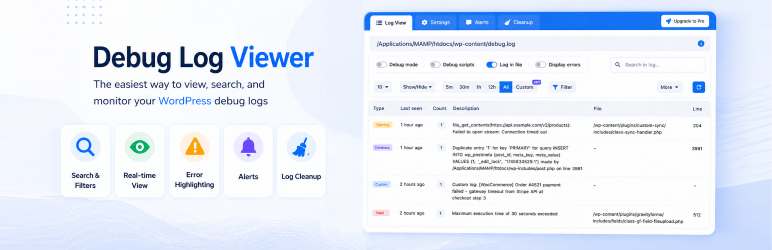
If you want to manage debug logs comprehensively, including automatic deletion, there is a plugin called " Debug Log Viewer," but the free version is quite large at a fixed 50MB. The Pro version allows you to change the size between 1 and 5000MB.